Latest Post
Showing posts with label Software. Show all posts

Clash of Clans: How to link your iOS and Android device


I’ve just started playing Clash of Clans and, so far, I’m really enjoying the game. If you’ve recently switched to Android from an iOS device and want to continue where you left off, there’s an easy way to import your progress.
Importing your Clash of Clans progress is called linking, doing of which is shown below:
  1. In your iOS device, simply go to the settings menu.
  2. Link a Device
  3. This is the OLD DEVICE
  4. I want to link to another device.
  5. Now in your Android device, go to the settings menu.
  6. Link a Device
  7. This is the NEW DEVICE
  8. Enter the link code displayed in your iOS device.
Note that the settings menu is accessible only after you’ve finished playing the tutorial. Since the Android device is presumably where you will import your old game progress, it doesn’t matter what username you chose and the new progress you’ve made—they will be, after all, overwritten by the imported file.
Finally, linking your iOS device with an Android gadget is only done once. Both devices are then synced together, so you can play on either one with your latest progress in the game. Also, linking to a new device no longer works if said device comes with a Town Hall Level 4 or have already made purchases.
The satisfaction of building a great base and the thrill of invading those of other players are opportunities too good to pass up. Indeed it’d be so disappointing if you have to start all over again just because you switched platforms. Luckily, developers these days make great games like Clash of Clans, while not forgetting cross-platform compatibility.
Recently ported to Android just last month, the Clash of Clans app is a free download via theGoogle Play Store. For those who can afford it or just want to speed things up a little, in-app purchases are also available.

List of Samsung devices to get Jellybean updates

When we posted the article yesterday, some of us (yes, including myself) were disappointed by the fact that your beloved Samsung device are still stuck with an old OS while their quad-core toting counterpart has already started getting the update.

But all is not lost as the South Korean company hasn’t totally neglected our devices. In line with the release of the Android 4.1 update for the SGS3, Samsung also made a short list of their current devices which would get the same treatment.

Galaxy Tab 2.7.0
Galaxy Tab 2 10.1
Galaxy Note 10.1
Galaxy S II
Galaxy Note
Galaxy Tab 7.0 Plus
Galaxy S Advance
Galaxy S II LTE
Galaxy Music
Galaxy Chat
Galaxy Ace 2
Galaxy Beam
Galaxy Ace Plus
Galaxy Mini II
Galaxy S Duos

The list is definitely a good start but it would’ve been better if they included a release date along with it. To make things worse, it was brought to our attention that some of these devices still don’t have ICS installed on it, especially those which are purchased from a telco. As soon as we’ve heard word when the update starts seeding, we’re sure to update you guys.

Tutorial: Install Google Now on your ICS device

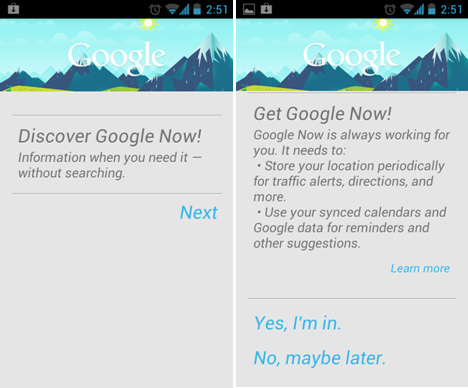
If you’re unsure if your beloved Android device will make it to the Android 4.1 shortlist, you can still enjoy some of the buttery OS has to offer. One of which is Google Now — one of its famed features.

Google Now is an intuitive voice search/assistance that takes note of your daily routine, preferences and interests. 

Those information are gathered and stored in the cloud and can then be used to, as Google says, “Give you just the right information at just the right time.” All the users need to do is just used their internet-enable-Android devices and eventually Google Now will take care of the rest.
For now this feature is only officially available in Jelly bean. But folks from XDA, won’t leave it at that as they ported Google Now on ICS. Porting this requires some software tweaking, so don’t attempt this unless you’re really sure of what you’re doing.
These steps are for devices running on AOSP ICS. If you installed custom ROM on your device, you can go to this link.
1. Download Google Now here.
2. Copy the downloaded file in your device’s root folder.
3. Flash CWM on your device.
4. Boot to CWM recovery and select install .zip from card.
5. Let it do its thing and reboot.
6. Once booted go to Play Store and download Voice Search for Google.
7. After that you now have Google Now with Voice search functionality.
I’ve been using Google Now on my Nexus S and it had worked like a charm. Couple of things that we noticed is that you can’t exit out of the app via Back button and the need for a third-party voice search app. 

These minor bugs are forgivable given that this build is still at its early stage and there’s a lot of room for improvement. We’re also hoping that folks from XDA can someday incorporate the ported app to the native voice search.

Galaxy S2 may not get Android 4.1 Jelly Bean update

Amid rumors regarding the Galaxy Note 2‘s debut at the 2012 IFA in Berlin this August, several posts are pointing fingers at the Samsung Galaxy S2‘s low resolution display which may be the reason behind the phone’s hazy path towards the Jelly Bean upgrade.

Despite some S2 users still not receiving the ICS update on their devices, late adopters of the popular smartphone from Sammy are already anxious for the Jelly Bean firmware, unfortunately, all that glimmering shine of hope is bound to disappear, the future of the Galaxy S2 owners who suffer from technophilia are at stake due to certain ‘hardware limitations’.

 
The Galaxy S2 — despite being dethroned by its successor — the Galaxy S3. Is still a dream to use thanks to the legendary 1.2 GHz Exynos 4210 processor. Surely no one would have thought that Galaxy S2 will be having any sort of ‘hardware limitation’ issues from the device’s performance front, a lot of people are still buying the S2 since they’re complacent that the phone is still good for at least another version or two of the Android OS. But what’s surprising is, the limitation is actually the most obvious part of the device — the screen.

The low resolution display of the Galaxy S2 is what seems to be holding back the development of Android 4.1 (Jelly Bean) since it’s said to be optimized for HD screens, according to the folks at Christian Post, some of the hardware limitations — apart from the aforementioned display, is that the dual-core processor may not be good enough for Android 4.1 since, quad-core chips are preferred for the latest OS. Another thing that could hold the S2 back from receiving the new Android build is that the handset will not run as smoothly with JellyBean and TouchWiz chugging at the same time. Which isn’t really surprising given that TouchWiz is a bit of a performance hog.

If the Galaxy S2 isn’t good enough then what about the Galaxy Note? Luckily the Galaxy Note has a faster-clocked processor (N7000 variant, @1.4GHz) and an 800p resolution screen similar to the of the Nexus 7 tablet, so the only thing that’s really barring the Jelly Bean update for the Note is TouchWiz.

As disappointing as this news may seem, there’s still hope. There aren’t any basis for these findings and the words that we need to hear should come directly from Samsung themselves. If this sad news turns out to be true, we can always count on devs and Android forums for custom firmware. No need to fret unless you don’t know how to flash a custom ROM.

Seems like Samsung and Google are working hand in hand to phase out phones that are still relevant on the market (such as the Galaxy S2 and Note). Are you thinking of the same thing?

Face Unlock feature on Android 4.1 becomes smarter

When Google announced the Galaxy Nexus running on Ice Cream Sandwich last year, one of its fancy features is the Face unlock. But we discovered that you can actually trick the lock screen by putting a picture of the registered face in front of the device. It’s not that secure after all.

While developing their latest buttery OS, Google decided to put in a little extra time to revisit this unlock feature and make it more secure.


They called it “Liveness Check”, an added security feature on Android Jelly bean that requires users to blink first in order to unlock the device. The reason we said that it’s just an added feature is because you’d have to manually and separately set it up from the Face Unlock.

This means you can still go for the basic and less secure face unlock or you can add more protection by switching on the Liveness Check. Pretty neat, right? But as early as now, we’ve already came up with a cunning way to trick this “added security feature” by placing another device while it’s playing a recorded clip of the registered face while blinking. We’ll sure to try it out once we get our hands on our Nexus 7.

The moral? Nothing beats a good hard-to-guess password/combination. It’s not full-proof, but it’ll sure give nosy bastards a run for their money.

Microsoft offers Windows 8 Pro upgrade for just $39.99

Here’s some good news coming from Microsoft. They just announced that users from Windows XP and up can upgrade to Windows 8 Pro for just $39.99 when it becomes available soon. That’s cheaper than some paid anti-virus programs and will probably force those with aging Windows XP machines to upgrade to the new OS.
The $39.99 upgrade promo price is a download-only offer (which you can use to create your bootable USB or burn an ISO copy to a DVD) and will expire on January 31, 2013. Once Windows 8 Pro RTM becomes available, head to Windows.com to purchase your Windows 8 upgrade. The Windows 8 Upgrade Assistant makes upgrading simple by walking you through the upgrade process step-by-step from purchase to download and then of course installation.

For those wanting a DVD package of the Windows 8 Pro upgrade, it will also be available in stores for $69.99 during this promotion period. Will let you know if Microsoft Philippines will have the same price on the offline package for the local market.

Run Android apps on your Mac with BlueStacks App Player

Chances are you’ve already heard of the nifty software called BlueStacks App Player before. No? Well BlueStacks App Player is used to run Android applications on your Windows PC – before. And recently, the company has launched an early alpha version of the software for Mac.
BlueStacks App Player Mac Hero
Unlike the Windows version, BlueStacks for Mac only supports 17 Android apps for now such as Twitter, WhatsApp, Facebook, Pulse and more. It is very similar to it’s Windows counterpart where you run the BlueStacks desktop client and from there, you can then launch Android apps or sync supported apps from your Android phone or tablet using its Cloud Connect feature.

Final Fantasy lands on Windows Phone 7

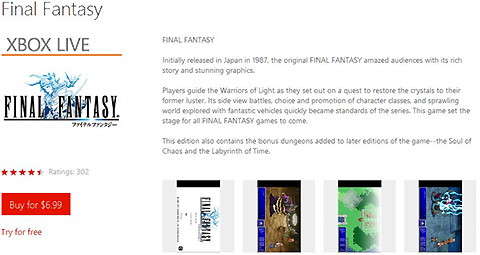
If you own a WP device and happen to be an avid fan of the award-winning media franchise from Square Enix, then you’d certainly enjoy this treat. Final Fantasy I/Origin is now available for download on WP Marketplace. Check out more details after the break.

This WP-version of Final Fantasy isn’t really new. This version of the game is based on the PSP version which was released in 2007 and is the same version of the game initially available in the Apple App Store some two years ago. That’s how delayed this game is in terms of release.
On the brighter side, due to the limited number of apps in Windows Marketplace, this highly regarded RPG is certainly a rare treat. In addition, there are going to be two bonus dungeons (Soul of Chaos and Labyrinth of Time) in the later versions of the game. On the Xbox Live Mobile Marketplace website it is hinted that this game will just be the first of many Final Fantasy games to come.

If the fact that the game is a bit outdated doesn’t disappoint you then its price might. The full version of this game costs Windows Phone users $6.99, which is almost Php300. That’s too pricey if ask us. So we suggest playing the free trial version of the game first to see if it’s worth your hard-earned cash. You can download the game here.
It’s also worth mentioning that the game requires at least 91MB of free space on your phone’s scarce memory. This can also be a possible deal breaker since WP devices is known for limited storage capacity due to lack of support for memory expansion.

For more information about the game, especially the gameplay you can hit the source link. You can also give us your thoughts about the game and your experience if ever you did install the game.

LG debuts Optimus UI 3.0

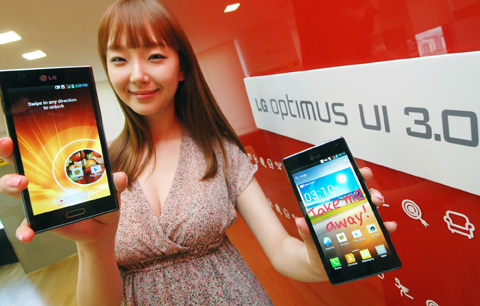
If you’ve handled a lot of Androids before, I’m pretty sure you’re already aware of UI skins. HTC has the Sense, Samsung has the TouchWiz, Motorola has the MotoBLUR, and Sony has the Timescape. And just now, LG reveals its new UI called the Optimus 3.0.
The Optimus UI 3.0 is designed with convenience and speed in mind and is dedicated to LG’s newest Android Ice Cream Sandwich devices. The new UI promises to bring new features and enhancements such as the Quick Memo, a function that enables users to write down notes on the screen using a finger. This allows users “to share their thoughts through social networks, text messages and e-mails more conveniently than ever before.”

Below are some of the other new features:

• the ability to unlock the phone by dragging anywhere on the screen;
• a new Pattern Lock that allows users to preset the most frequently used function, such as the camera, which automatically opens once the phone is unlocked;
• a simpler version of Optimus UI 3.0 for new smartphone users which organizes the main applications so that they are the easiest to access;
• a new Voice Shutter that allows users to capture photos using only voice commands;
• a special camera feature that enables users to pick up the best shot among multiple images including the moment just before the shutter button is depressed;
• an Icon Customizer that provides an additional level of personalization by allowing users to set their own photos as icons and shortcut images;
• the addition of a Download category to the menu for easier organization.
The Optimus UI 3.0 will debut on upcoming devices such as the LG Optimus LTE II and LG Optimus 4X HD.
Question for the readers – What do you think is the best Android UI skin out there? Share your thoughts below. 


Source: yugatech

Viber for BlackBerry is here!

So here you go — starting yesterday, Viber for BlackBerry is now available in the App World. It took them some time but it’s finally here for BB users.
The version for the BB app still has limited features though:
Viber lets you send text and photo messages, anywhere in the world (Free calls coming soon as well). All you need is a 3G or WiFi connection, and friends who get Viber too.
I started using Viber on the iPhone and my Android phones last March when I was on a month-long trip to Europe. Been using it ever since especially when I am out of the country and lookign for alternatives to SMS and voice roaming.

You can grab it here.

Apple releases iOS 5.1.1 update, already Jailbroken

Apple has just released a minor update for its line of iOS devices namely the iPad, iPod Touch and the iPhone. The 5.1.1 update (54.5 MB in file size) focuses on improvements and bug fixes which include:
    • Improves reliability of using HDR option for photos taken using the Lock Screen shortcut
    • Addresses bugs that could prevent the new iPad from switching between 2G and 3G networks
    • Fixes bugs that affected AirPlay video playback in some circumstances
    • Improved reliability for syncing Safari bookmarks and Reading List
    • Fixes an issue where ‘Unable to purchase’ alert could be displayed after successful purchase
To get the update just plug in your device in your computer then fire up iTunes on your desktop and you will be prompted with the update or simply go to Settings – General – Software Update on your device to download it OTA.

Updates and upgrades are cool. This means less bugs and more fluid experience for iOS users. But this also means getting rid of your jailbreak. 

Luckily for jailbreakers, the iOS 5.1.1 update is already PWNED! That’s right. You can now jailbreak tethered your A4 devices using Redsn0w. Follow the instructions here. Do this at your own risk though as this process voids your warranty and might brick your device.

International Women's Day: Celebrating Women in Tech


International Women
International Women's Day is not a day to drag out the familiar (and all-too-true) lament about the dearth of women in technology or debate the merits of computer scientist Barbie.
At PCMag, we're celebrating women who have improved the world through technology. Some of the first technological achievements are directly attributable to women. The title of world's first computer programmer goes to Ada Lovelace, daughter of the poet Lord Byron, whose notes on Charles Babbage's analytical engine are recognized as the first algorithm for processing on a machine.
The computers that descended from the analytical engine advanced during World War II. The Allies owed a large part of their victory to the decryption of the German's Enigma ciphers, an effort carried out with the revolutionary aid of women at the Bletchley Park research center tucked away in rural England and at Arlington Hall in Virginia. The first "computors" were also women. At the University of Pennsylvania's Moore School of Engineering, Fran Bilas, Ruth Lichterman, Marilyn Wescoff, Adele Goldstine, Betty Snyder, and Kay McNulty each claimed that title in their work programming ENIAC, the first electronic computer and the one that calculated artillery firing for the United States in World War II.
Even Siri, who is appropriately voiced by a female, is a product of the voice technology first employed by teams of female telephone operators manipulating voders and vocoders to synthesize human speech. The male voice that issues from a vocoder has even been manipulated by performance artist Laurie Anderson in pieces like "O Superman," a commentary on technology's effect on communication and war.
In honor of these pioneers, here are some of the women that run the tech world.

Windows 8 Consumer Preview now available for download

Microsoft recently made the latest and bestest Windows 8 version, Consumer Preview, available for downloading. If you want to experience the upcoming Windows 8 this early, or simply want something different on your laptop, the Windows 8 is for you.
Download the Windows 8 Consumer Preview
Windows 8 is characterized by the Metro style theme found in Windows Phones and this should translate well for touchscreen devices. It’s really a refreshing look but if you want to go hardcore or you feel disoriented with the new UI, there’s still the option to switch to the familiar Desktop view.
 
I highly recommend watching this demo video of the Windows 8 Consumer Preview:


Really nice huh? I think it will really change the way we do or see computing. Microsoft really did a bang up job marrying the tablet and desktop experience in one platform even though the gestures for the touch devices strongly remind me of the BB PlayBook.

Windows 8 Consumer Preview System Requirements:

  • Processor: 1 gigahertz (GHz) or faster
  • RAM: 1 gigabyte (GB) (32-bit) or 2 GB (64-bit)
  • Hard disk space: 16 GB (32-bit) or 20 GB (64-bit)
  • Graphics card: Microsoft DirectX 9 graphics device or higher
Take note for netbook owners who wants to run this, to access the Windows Store, download and run apps, a screen resolution of 1024 x 768 is required.

To download, simply head to the Windows 8 Download page and get your Setup file. Here are the file sizes you will be dealing with but download resume is supported.
  • Setup file – 5MB
  • 32-bit Windows 8 Consumer Preview – 1.5GB
  • 64-bit Windows 8 Consumer Preview – 1.9GB
For more information, I suggest reading the FAQs Microsoft prepared.


Android 4.0 ICS update for Asus Transfomer TF101


Asus has just announced the upgrade of Android 4.0 Ice Cream Sandwich to theirAsus Transformer TF101 started rolling out last night. The update is coming over-the-air on the 1st-gen tablets.
Asus Global posted the good news on their Facebook Page about 15 hours ago:

Dear valued ASUS fans,

ASUS prides itself on delivering the best products to end-users, which means that we not only aim to deliver innovative products but also to continue improving the out of box experience throughout their life cycle with regular firmware updates.

Many of our Eee Pad Transformer TF101 users have waited patiently for the promised Android 4.0 Ice Cream Sandwich update and we are delighted to announce that the first wave of FOTA updates for TF101 firmware v.9.2.1.11 started today in Taiwan. The update will FOTA in other regions soon after.
Although we will announce several new innovations at Mobile World Congress in Barcelona next week, we take great pride in delivering on-going enhancements and support for products that are well into their life cycle.

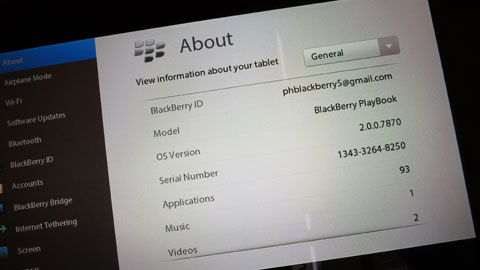
BlackBerry Playbook OS 2.0 now out, ready to download!


RIM has just send out notice that the BlackBerry Playbook OS 2.0 update is now available to all Playbook tablets. This global update is available over the air (OTA).

If you have your BB Playbook, just connect to a stable WiFi and start updating.

1. On the Status bar, tap Settings icon » Wi-Fi.
2. Tap the network you want to connect to.
3. If necessary, type the network password.
4. Tap Connect.

Then update software:
1. On the Status bar, tap Settings icon » Software Updates.
2. Tap Check for Updates.
3. Tap Update and follow the on-screen instructions.


Still waiting to update my Playbook once I get home in an hour. If you have done so, please chime in and let us know how it goes.

Mac vs. Windows: The “McDo WiFi Guide” Revelation

This McDonald’s brochure for the store’s WiFi Guide paints a clear picture between the Windows and the Mac OS X operating systems; but that really depends on where you’re coming from.
The brochure shows step-by-step instructions on how to connect to the McDo WiFiand it clearly shows the Windows operating system taking 2 out fo the 3 pages while it’s barely half a page for the Mac {via}.
There’s a catch though — the instructions for connecting WiFi on Windows OS includes 3 variants — XP, Vista and Win 7; while on the Mac, it’s just one (they didn’t bother separating Tiger, Leopard and Lion).
Second, the instructions for the Windows users assumed that the PC is set up manually and needs to be changed to Automatic. ON the Mac, they assumed the network is set to Automatic.

Of course, depending on what operating system you frequently use, one might have a totally different understanding.

A Mac user would say “reminds me why I chose the Mac in the first place.“.

A Windows user would say “well, now we know who’s the nerd, right?“.

So, what would you say?


This article originally appeared at - yugatech
 
Support : Creating Website | Johny Template | Mas Template
Copyright © 2011. PctechPortal - All Rights Reserved
Template Created by Creating Website Published by Mas Template
Proudly powered by Blogger