Latest Post
Showing posts with label Tablet PC. Show all posts

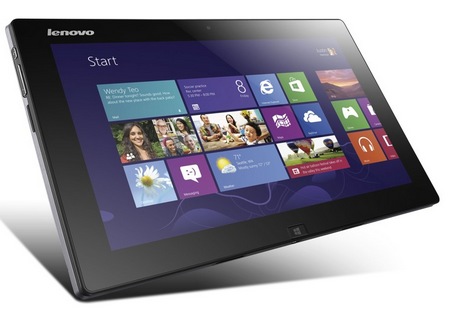
Lenovo IdeaTab Lynx Windows 8 Tablet with Optional Keyboard Dock

Lenovo will also release the IdeaTab Lynx Windows 8 hybrid tablet/notebook targeted at mainstream consumers. Unlike the IdeaPad Yoga and ThinkPad Twist with integrated keyboard, the IdeaTab Lynx has a optional detachable keyboard dock featuring AccuType layout for comfortable typing. The dock also packs 6800mAh battery to double the battery life to 16 hours. You can remove the Lynx from the keyboard dock and uses it as a standalone tablet.

Lenovo IdeaTab Lynx Windows 8 Tablet with Optional Keyboard Dock remove
The IdeaTab Lynx is powered by latest Intel dual-core Atom processor and 2GB RAM, and has 32GB or 64GB SSD storage. It features a 11.6-inch IPS multitouch touchscreen display, a 2 Megapixel front-facing camera for video chat and Dolby Home Theater for cinema soun. The tablet itself has a micro USB port, micro HDMI output and a microSD/SDHC card, while the keyboard dock has two USB 2.0 connectors for connecting printer, external drive and other accessories.

Lenovo ThinkPad Twist Windows 8 Convertible Ultrabook for Business

Other than the flipping IdeaPad Yoga, Lenovo also brings the ThinkPad Twist convertible Ultrabook for business. While Yoga’s screen flips, the display of the Twist goes further that it is not just flips but also swivels, and this is the reason it gets its name. It is powered by Intel’s Ivy Bridge processor up to Core i7 with up to 8GB of RAM and runs Windows 8 Pro.

Lenovo ThinkPad Twist Windows 8 Convertible Ultrabook for Business twisting
The ThinkPad Twist comes with up to 500GB 7200RM hard drive or 128GB SSD for storage. It has a 12.5-inch IPS touchscreen display with 350-nit brightness with Gorilla Glass, and provides mini HDMI and mini DisplayPort for connecting a bigger monitor. The convertible ThinkPad also features WiFi connectivity, chiclet keyboard, memory card slot, two USB 3.0 ports, TPM and optional 3G support. As a tablet for business, the Twist comes with dedicated software tools specifically for small business including Lenovo Solutions for Small Business powered by Intel Small Business Advantage and Lenovo Cloud Storage by SugarSync.

Lenovo’s ThinkPad Twist will be released on 26 October starting at $849. Lenov will also release the ThinkPad Tablet 2 Windows 8 tablet PC with optional digitizer and pen for precision input in November for $649.
Lenovo ThinkPad Twist Windows 8 Convertible Ultrabook for Business stand 1
Lenovo ThinkPad Twist Windows 8 Convertible Ultrabook for Business 1
Lenovo ThinkPad Twist Windows 8 Convertible Ultrabook for Business twisting 1
Lenovo ThinkPad Twist Windows 8 Convertible Ultrabook for Business stand
Lenovo ThinkPad Twist Windows 8 Convertible Ultrabook for Business front

Lenovo IdeaPad Yoga 11 and Yoga 13 Convertible Hybrids for Windows 8

Lenovo adds to its IdeaPad line two new convertible hybrid notebook/tablet computers, the Yoga 11 and Yoga 13, designed for Windows 8. With Yoga as their name, both convertibles has a flip-and-fold design, featuring a hinge that allows them to move 360-degree and fold from laptop to tablet in one simple motion. The bigger Yoga 13 is basically a multi-mode Ultrabook powered by Intel x86 processor and runs Windows 8 Pro, while the Yoga 11 runs Windows 8 RT on ARM-based processor.

Lenovo IdeaPad Yoga 13 Convertible Hybrid Notebook Tablet Windows 8
Lenovo IdeaPad Yoga 13

The IdeaPad Yoga 13 is powered by Intel’s Ivy Bridge 3rd gen Core i5 or i7 processor, up to 8GB of RAM and up to 256GB SSD storage. It has a Ultrabook design, ad measures just 16.9 mm thick. The 13.3-inch IPS display features 1600×900 resolution and multitouch. You can also find a 720p front-facing camera for video conferencing, Dolby Home Theater sound enhancement, USB 3.0 port, media card reader and HDMI output. It promises 8 hours of battery life.

Acer announces Iconia Tab A110, Nexus 7 contender

Acer has now formally announced the Iconia Tab A110 which is set to replace the thick, dual-core A100 from last year.

First spotted at this year’s Computex, the Iconia Tab A110 looks to put up a good fight with the Nexus 7. Both these 7-inch tablets’ specs are virtually identical even the OS that comes pre-installed with it out of the box are the same.
If anything, the Iconia Tab A110’s edge over the Nexus 7 is its expandable memory via Micro-SD card slot which was one of the main features missing on the latter. The newly announced tablet also sports a micro-HDMI port for extra connectivity option. However, Acer’s new tablet’s Achilles heel is its sub-par display which only has 1,024 x 600 screen resolution compared to the Nexus 7’s 1,280×800.

The Acer Iconia Tab A110 will have a slightly higher price tag compared to the Nexus 7, £20 to be exact. The tablet has just been announced in the U.K and a global launch is still yet to be announced. So are you willing to give away a few pixels for the ability to expand your storage via Micro-SD slot or you’d rather stick with the Nexus 7?

HP tablet for the enterprise market coming soon

Just hours ago, HP posted a press release on its web site announcing a new lineup of consumer and business PC products, including desktop and notebook computers. However, right down at the bottom of the post, the company also gave us a clue regarding a product, which a recent advertisement might have already outed. "An enterprise-ready tablet will be announced soon," HP stated, without revealing any further details whatsoever.

HP is working on an enterprise-ready tablet
Now, we might not know what the hardware specs of this upcoming device will be, yet we can safely assume that HP is not planning to ship the said device with Android. Instead, it seems likely that the tablet will run a flavor of Windows 8 – either Pro or RT, depending on what kind of processor it is powered by. Or at least that is how we interpret the slate's enterprise readiness. We are also expecting to see an Intel processor humming inside the tablet, given HP's statement that it isn't planning any ARM-based hardware for now.

That is pretty much all we know so far, and we hope to have more details on this HP tablet sooner than later. Is anyone excited to see what kind of slate HP has in stock for us?

source: HP via Engadget

Bmorn V99, V16 Android ICS Tablet Review

We’ve got another set of affordable Android ICS tablets on our hands — a 10-inch Bmorn V99 and the samller, 7-inch Bmorn V16. Catch our full review of these two tablets after the break.

Design and Construction
V99

The overall design of the V99 actually resembles that of the 7-incher Ainol tablets that we’ve previously reviewed. From its rounded edges down to its black shiny plastic back complete with labels which attracts fingerprints like there’s no tomorrow, the V99 is in our opinion NOVO7’s bigger brother from another mother.

A quick tour on the tablet’s sides will reveal a total of 5 shiny silver buttons. One for Power, Home and Menu and two for the volume rocker. 

Alongside the home button are a set of ports for microSD, micro-HDMI, micro-USB OTG (which I assume means On-The-Go), a regular micro-USB port, charging and two holes for Reset and Mic.
Situated laterally across the other side of the Power button is the 3.5mm audio jack.

On its back are the device logos and small labels for the corresponding ports, holes and buttons. Those labels proved helpful to ease some of the confusion brought by the 5 buttons, 5 ports and 3 holes found on the tablet.
And oh, don’t miss the inconspicuously placed 2MP camera also found at the back of the slate. Now there’s something we don’t see quite often on ChinaTabs (that didn’t sound right). Since they’re in to labeling, I just wished that they also labeled this part or put like a mark or something just to indicate that there’s a camera there. 

In addition to the rear camera, the tablet also has a front-facing snapper for your camwhoring and/or video chatting pleasure. 

V16

For the V16, although small, delivers more good looks compared to its older brother. It’s also curved around the edges with the front of the device is solely for the screen and a tiny front-facing camera. On the upper right of the device (on landscape) you’ll find the power button, volume rocker, and the return button. On the left is the headset jack, microphone, micro USB and micro SD card ports.
Turn it on its backside and you’ll realize why the V16 looks better. Instead of glossy black, it has an anodized metal back case in a brownish-gray finish. There you’ll find the speaker grill and a textured piece above it which to be honest, I don’t really know the purpose of. Overall, it’s thinner and looks better. 

Display

The V99 sports a 9.7” LCD Capacitive Touch screen display with a screen resolution of 1024 x 768, which is what we typically get from Chinese tablets. 

There’s really nothing out of the ordinary with the tablet’s screen, just the bare minimum. From watching movies to reading e-books, the V99 pretty much gets the job done indoors with plenty of room to spare thanks to its screen size. Just don’t bring it outdoors because legibility can be an issue.

For the V16 you’ll get a 7-inch, 800×480 pixel resolution, TFT capacitive display. Not exactly high-resolution so pixels are very evident.

Audio

We’re pretty disappointed with the sound output from the V99’s speaker as it is far too soft for comfortable listening. We suggest plugging a pair of earphones when you plan on listening to your tracks or watching a film with this tablet. 

For the V16 I’d give the same suggestion, although the sound is very audible, it sounded like it’s coming from a tin can.

Performance

Another downside to this tablet is that it is only equipped with a single core 1.2GHz All Winner A10 processor with MALI 400 for GPU. This is the same processor used in the Ainol NOVO7 Aurora and NOVO7 Advanced II. But for its price, we really can’t expect too much. The performance out of it was rather poor as shown in the benchmark results.

Usually we use to perform three benchmark tests (AnTuTu, Quadrant Standard and NenaMark) on each device that we review but we were only able to perform Quadrant on the V99 because the device is not compatible to run AnTuTu. We’ll talk more about software compatibility later on.
For the V16, AnTutu gave it a score of 2,696, above the Sony Ericsson X10i but below the Samsung Galaxy S. Quadrant Standard gave it a score of 1,707, surprisingly scoring higher than the V99 but still placed itself at the bottom of the charts.

For NenaMark, it scored 25.7 with its Mali-400 MP GPU, beating the Samsung Galaxy S but lost to the LG Optimus 2X.

OS and UI

The Bmorn V99 originally shipped with Gingerbread. But to make it at par with its competition, the newer models will have ICS pre-installed on it. But rather than do the tablet good, we think that the OS upgrade actually made the tablet worse. This is by far the worst Ice Cream Sandwich build we’ve seen on a device. 

Here’s why — there’s an intolerable lag even on the most simplest of operations. Most of the time, we try to give a slight consideration to the device that we review, especially when it comes to lag. Frankly, this tablet’s lag is off the charts. We’re not sure if it’s the hardware, software or both that causes this, but bottom line we find it too laggy.

We think that the OS is not fully optimized on the device which is evident on the indicators such as battery bar and WiFi signal. There were inconsistencies in the status being shown and the actual status. For instance, I placed my Huawei Wi-Fi hotspot directly on top of the V99 but the Wi-Fi bar is only showing 2 bars.
The V16, however, gave us a cocktail of mixed emotions. It’s not that laggy compared to the V99 but when it does, it really makes itself known. Out of my 5 games with Fruit Ninja, it stalled 2 times which forced me to exit the game and restart it. Once it became laggy but keeps on playing anyway. 

Temple Run works well. Out of 5 games it only lagged once. Although the gyro doesn’t work well even after tweaking the Accelerometer coordinate system. So no tilting maneuvers on this one.

Do other stuff such browsing, social networking, movie and music playback, and it runs smoothly 95% of the time.

Virtual Keyboard

As with any other device with a big screen, typing is expected to be a breeze and Bmorn V99 shouldn’t be an exception to that. But with the OS issue that we’ve experienced, even typing can be a pain in the neck because the tablet has a bad habit of not registering keyboard taps. For the 7-incher, expect it to be a bit cramped. No lags were experienced so all keys register with perfect timing.

Camera

One of the few things that this tablet has going for it is its camera, or two cameras I should say. This is a rare feature for Chinese tablets because we’re used to seeing just one camera (front-facing) and sometimes even none. Both of the cameras in this device are 2MP. Not really the best snapper in town but should get the basic job done. 

We did however encounter an issue when we used both cameras for Skype. It was erratic. Our guess is that it has something to do with the app, not being optimized for the device or it’s just the device to start with. 

Nothing much to be said about the V16 as it only has a 0.3 megapixel front-facing camera. If there’s one thing to be said about it is it’s too grainy.

Battery Life

As we mentioned earlier we didn’t really have a good read on the tablet’s battery life because of the unreliable battery status being shown by the OS. So we just decided to play a bunch of movies and see how far it can go. We averaged about 2 and half 720p movies with Wi-Fi on in a single full charge, which is actually pretty decent. Here’s a screen shot of the battery status after normal use.
Notice the message Battery usage data not available at the top. You’d have to get used to that. Anyway we’re banking on this screenshot for the actual battery life but we decide to attach this just to give you a visual idea of the V99’s battery life.

For the V16, even with the 3500 mAH battery, it only lasted for almost two days with constant WiFi connectivity and 6 hours-worth of movie playback.

Hardware Configurations

Bmorn V99 specs:
9.7 TFT capacitive LCD @ 1024×768, 132ppi
1.2GHz All Winner A10 processor
Mali 400 GPU
512MB RAM
16GB internal storage
up to 16GB via microSD
WiFi 802.11 b/g/n
2MP rear camera
2MP front-facing camera
Android 4.0.3
243 x 190 x 11.8mm (dimensions)

Bmorn V16 specs:

7-inch WVGA TFT capacitive display @ 800×480
Allwinner A13 1GHz processor
Mali 400 GPU
512MB RAM
8GB of internal storage
up to 16GB via microSD
WiFi 802.11 b/g/n
1.3 megapixel front-facing camera
3500mAH Battery
Android 4.0.3 ICS
190 × 121 × 10mm (dimensions)
370g (weight)

Conclusion

This tablet is one of the cheapest 9.7-inch tablets we’ve seen so far. In our opinion, the Bmorn V99 will have a tough time competing against other Chinese tablets with a slightly better engine under the hood that are already out in the market. 

In addition to the lacking hardware component, the ICS build on this device is by far the worse we’ve seen from a tablet to say the least. Apart from the 2 cameras and decent battery life, there’s not much going for this tablet.
With the V16’s case, we can pretty much say the same thing. Although it works it still needs a lot of improvement, especially if it wants to compete with other 7-inchers out there that can perform a lot better.

Velocity Micro Cruz T508 Android 4.0 Tablet


Velocity Micro is launching the new Cruz T508, a 8-inch tablet running Android 4.0 Ice Cream Sandwich. Instead of 7-inch 16:9 form factor, the T508 gets a 8-inch capacitive touchscreen in 4:3 aspect ratio with 1024×768 resolution. It is powered by a Cortex A8 1.2GHz processor with 1GB of RAM and dual Mali-400 2D/3D Core graphics processor.


The new Cruz tablet hash 8GB internal storage and supports microSD/SDHC up to 32GB. Running Android 4.0, the tablet comes pre-loaded with Amazon Kindle, Amazon Appstore, Adobe Flash Player, Angry Birds Space and QuickOffice Pro for viewing and editing Microsoft Office files. It gets a front camera and a rear camera for taking pictures and video chat. You can expect WiFi connectivity.


Lenovo ThinkPad X230 and X230t Ultraportables get Ivy Bridge

Lenovo ThinkPad X230 and X230t Ultraportables get Ivy Bridge
Lenovo is launching in June its latest ultraportable notebooks, the ThinkPad X230 notebook and the ThinkPad X230t convertible tablet, designed for business professionals on-the-go. Replacing the X220 and X220t, the new models are powered by Intel’s Ivy Bridge 3rd gen Core processor. They are compact, slim and lightweight that the X230 is just 3 pounds, but still deliver up to 24 hours of battery life (with ThinkPad 19+ slice battery).

Lenovo ThinkPad X230 and X230t Ultraportables get Ivy Bridge front 1
The new ultraportable ThinkPads have a 12.5-inch IPS LCD display with 300-nit brightness. The X230t, as a convertible, can fold back the screen and transform into a tablet PC and get optional touch panel. They are equipped with new precision keyboard with improved ergonomic design and optional backlight. Lenovo also adds 4G LTE support for mobile connectivity, Dolby Advanced Audio v2 sound enhancement and USB 3.0 SuperSpeed connectors to these Ivy Bridge notebooks. Other features include integrated card reader, Mini DisplayPort, 720p HD webcam and dual-array microphone as well as the classic TrackPoint.

The ThinkPad X230 and X230t will be released in June and start at $1179 and $1479, respectively.
Lenovo ThinkPad X230 and X230t Ultraportables get Ivy Bridge 1
Lenovo ThinkPad X230 and X230t Ultraportables get Ivy Bridge front
Lenovo ThinkPad X230 and X230t Ultraportables get Ivy Bridge back
Lenovo ThinkPad X230 and X230t Ultraportables get Ivy Bridge flat
Lenovo ThinkPad X230 and X230t Ultraportables get Ivy Bridge connectors
 
Support : Creating Website | Johny Template | Mas Template
Copyright © 2011. PctechPortal - All Rights Reserved
Template Created by Creating Website Published by Mas Template
Proudly powered by Blogger