Latest Post
Showing posts with label MP3 - Player. Show all posts

HP TouchPad price drops by $100 this week-end


The HP TouchPad is getting a price cut this week-end with the 16GB model at just$399.99 (roughly Php17k) so I asked my friend in the US to get me one immediately.
But that’s the catch though, the $100 discount is only effective from August 5 to 7 (US time). It’s also on sale in Amazon.com here.
HP TouchPad9.7″ IPS display @ 768×1024 pixels1.2GHz Qualcomm Snapdragon dual-core APQ8060 processor (this is Snapdragon S3)Qualcomm Adreno 220 core1GB memory16GB and 32GB internal storageHP webOS 3.0WiFi 802.11 b/g/nBluetooth 2.1 w/ EDRaaGPS1.3MP front-facing cameraSMS and MMS supportFlash supportmicroUSB
6300mAh battery
Announced back in June, the HP TouchPad is a webOS-powered tablet — a product of HP’s acquisition of Palm.


This article originally appeared at - yugatech

TDK intros new speakers and headphones


If you were born in the 80′s and loved listening to music , TDK must be very familiar to you. I grew up with a Sony AM/FM Cassette player and my dad has lots of cassette tapes. One of the top brands is TDK.
Two Saturdays ago on a rather intimate press launch at Digital Walker Cafe, Eastwood, TDK re-introduced their brand but this time in the audio solutions segment particularly speakers and headphones.
They launched a 2.1 3-speaker system called Boombox, and a couple of headphones for music listening pleasure.
Looks like Soundwave’s brother, you won’t have to wonder why this thing is called the Boombox. This 2.1 speaker will be exclusively available at the Digital Walker store in Eastwood Mall, Libis, Quezon City this August.

Boombox Specs:

  • Speakers: Two 6-inch coaxial drivers plus subwoofer
  • USB port for iPod/iPhone
  • 3.5mm audio jack
  • Auxiliary audio jack for instrument and mix
  • Digital AM/FM tuner with 5 presets
  • 35 Watts RMS
  • 15 Watt sealed subwoofer
  • AC power supply
  • Expected SRP is P35k

Other headphones include the TDK WR-700 which we reviewed recently, a Kleer-based wireless headphone retailing for Php5,000.00.
Then there’s also the high-fidelity on-ear headphones, ST-800, which is priced at Php6,500.00. This one has volume controls on the ear-cups and equalizer toggle built-in on the cord to adjust bass and treble.
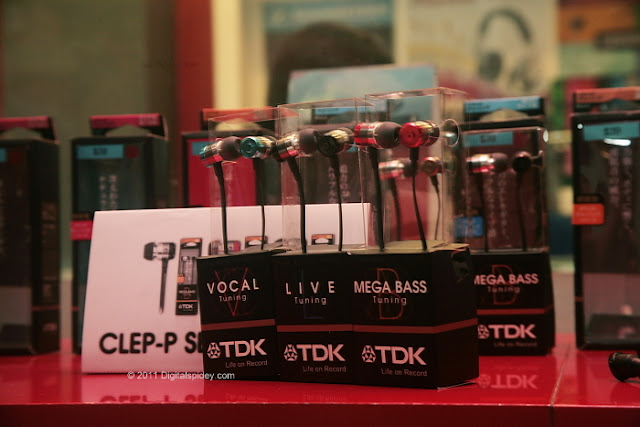
The Clep-P Series earphones present a different moods depending on the type of tunes you typically hear. You can choose from different models – Vocal, Live and Mega Bass. These earphones will be available soon.


This article originally appeared at - pinoytechblog

The BlackBerry PlayBook Experience

Ever since Research In Motion (RIM) released a 7-inch tablet that runs on a dual-core 1 GHz processor, everyone’s been pretty excited about getting their hands on it. We finally had a chance to really tinker with this stylish matte beauty.
A couple of months ago, we had our brief hands-on with the BlackBerry PlayBook and we’ve already given you the lowdown on the specs. This time, let’s focus on the user experience.
I’ve been a BlackBerry user for more than a year and I’ve really been looking forward to using the PlayBook since I heard that it could be paired with my BlackBerry smartphone. That was actually the first thing I did the moment I got my hands on it (well, aside from learning the basic swiping motions which was awkward for me at first, but got the hang of it in just a short time).
BlackBerry Bridge – The wonder of pairing your BlackBerry Smartphone and the PlayBook
When I found out that the PlayBook won’t have a 3G version, I was a little disappointed because I wanted it to be mobile without relying on WiFi areas. It so happens that pairing the BlackBerry Curve 8520 smart phone via Bluetooth would solve my problem! I just had to download BlackBerry Bridge for my Curve, pair them, then voila! The PlayBook is mobile c/o my Curve’s BIS.
The thing with pairing the Curve 8520 with the PlayBook, the most connectivity it could give is through EDGE connection. To get maximum results, I tested the PlayBook with the Torch 9900 as well since the Torch offered 3G connectivity which you will enjoy more with your PlayBook.
BlackBerry Torch and BlackBerry PlayBook
How I love this whole BlackBerry Bridge technology! The PlayBook mimicked my Messages (SMS not included – just emails and BBM messages), Contacts, Calendar, BlackBerry Messenger and MemoPad right from your phone to the tab in an instant. I don’t have to worry about transferring all my contacts and calendar information into the PlayBook – everything was suddenly there.
Whatever I performed with the smartphone appeared in the PlayBook and vice-versa. If I send a BBM to someone using the PlayBook, my smartphone mimicked it. I also tried opening Facebook (the full website) in the browser of the PlayBook as well as Facebook on my desktop computer, turned on Facebook Chat and the PlayBook mimicked what I typed in my chat window on my desktop. It’s like picking up where I left off when I switch gadgets. By the way, you need to use Bridge Browser instead of the native browser whenever you’re using your phone’s internet.
BlackBerry Bridge BlackBerry Bridge
You also won’t have to worry about having your Bridge disconnected just as long as your smartphone is nearby. The pairing is pretty impressive – I could leave it on and idle for a couple of days and it wouldn’t disconnect. There were instances that I had to do a battery pull on my smartphone and after rebooting, it just automatically pairs to the PlayBook. No need to reconnect every time.
Upon disconnecting the Bridge, you’ll also find that all mimicked Messages, Contacts, Calendar entries, etc are immediately erased from the PlayBook since it’s no longer paired, not even on the cache. You won’t have to worry too much about your officemate “borrowing” your PlayBook and sending a prank email blast to all your coworkers saying that you have a crush on your manager.
BlackBerry Bridge
The PlayBook is not dedicated to just one smartphone – you can pair multiple smartphones (one at a time) just as long as they have the Bridge.
Multimedia
I am really impressed by the screen of this tab. The colors are very rich and vibrant thanks to the 7-inch screen and its 1024 x 600 resolution. This is perfect for viewing photos and watching videos.
Upon plugging the PlayBook to my desktop computer, it prompted me to install the Device Manager. After doing so, I’m able to transfer music and videos into the PlayBook by a simple drag-and-drop into their corresponding folders just like you would with your external drive.
PlayBook sample video
The PlayBook recognizes a number of file formats and I didn’t need to convert my videos for them to play. I watched an HD copy (2GB) of Despicable Me in MP4 format on the PlayBook and the HD playback was just smooth and amazing! It won’t accept MKV or subtitle files by the way. The sound quality coming from its dual front speakers was pretty good but if you hook them up with some external speakers system then you have yourself a personal mini home theatre with you!
PlayBook Sample Photo
As for the camera, I can’t say much about it – I think it serves its purpose although I think that the objects seem closer when I try taking pictures with the PlayBook.
Applications
I must say, I wasn’t too impressed when I browsed through the BlackBerry App World because of the number of available applications for the PlayBook. Apparently, all apps that you are able to download to the PlayBook must be specific for the PlayBook. I wanted to install some apps that I had on my smartphone such as UberSocial, Shazam, Google Maps (to name a few) and they were nowhere to be found.  Unless they are specific for the PlayBook, you’ll have to wait until new apps are developed.
PlayBook App View
I can’t help but compare the number of apps available for the PlayBook with other popular tabs that have been released in the market. It seems that the PlayBook is a way too far behind compared to iOS and Android platforms.
PlayBook Scrapbook
There ARE a handful of apps available in the App World that has been developed but a lot of them have to be purchased. Some impressive free apps I encountered were Need For Speed (NFS) Underground, Scrapbook, Video Chat which only works with other PlayBooks, and Word/Sheet/Slideshow To Go.
PlayBook Bing Maps PlayBook Hangman
I wasn’t all too impressed about Bing Maps because I couldn’t find my street in it. Maybe it’s more helpful for North America users. There are also some apps, like Hangman, that makes me wonder if the people at RIM filter out apps for the App World – it was functional but images were just extremely primitive.
PlayBook Presenter's Edge
There’s this app called Presenter’s Edge that I was curious about that lets you use your PlayBook as cue cards and control your PowerPoint through a remote. Imagine how impressive that could be for the next time you have a pitch for your boss!

Verdict – Is the BlackBerry PlayBook worth it?

As a BlackBerry user, I would really want one because the BlackBerry smartphone and the PlayBook is a match made in heaven! The BlackBerry Bridge makes it possible to pair both technologies so you won’t have to worry about not being mobile if WiFi isn’t available. Right now this is the advantage of the PlayBook compared to the other popular tabs that are available on the market.
For me though, the only downside is that I’ll have to be a little more patient in waiting for “fun” apps to be developed for the PlayBook. I wish RIM would release the app that would allow Android apps to run on the PlayBook. The PlayBook recently won a Stevie award this 2011 because of its usefulness in businesses. If you’re going to use it as a business tab, then I recommend it especially if you also have a BlackBerry phone.
The BlackBerry PlayBook will be available in the Philippines starting August 6 with the following pricing:
  • 16GB at P23,990
  • 32GB at P28,990
  • 64GB at P33,990
Fairly reasonable if we’re to compare it to the pricing of Apple’s iPad 2 WiFi.


This article originally appeared at - pinoytechblog

LG Optimus Pad goes on pre-order w/ Php15k discount

Looks like the LG Optimus Pad is coming to town very soon. LG Philippines is going to open the pre-order site to the public tomorrow. And to sweeten the deal, they’re giving a Php15,000 discount to those who signed up for the pre-order of the Android tablet.
Here’s the screenshot of the pre-order micro-site which should be up soon.
The LG Optimus Pad is the first Android tablet that supports 3D video recording of up to 720p using dual HD cameras at the back panel.
LG Optimus Pad P980
Dual-core Nvidia Tegra 2 1.0GHz processor
8.9-inch display, multi-touch @ 1280×768 pixels
32GB internal storage
Two 5MP camera
3G/HSDPA
WiFi 802.11 b/g/n
GPS
Bluetooth
HDMI port
Android 3.0 Honeycomb
We still don’t have the final price of the Optimus Pad but considering they’re offering Php15k off, the SRP I’m sure it’s going to be under Php20k once the discount is applied (I’m thinking Php15k after the discount).
Update: Ok, the banner ad from LG is up on the sidebar and I’m seeing a retail price of Php50k (whoa!), so even if you apply the Php15k discount it ends up at Php35k. Now I have to say that’s really pretty expensive.


This article originally appeared at - yugatech

TDK ST-800 HiFi Headphones

TDK launched a slew of audio accessories last week and though I wasn’t able to attend the event, they gladly sent over one of their high-end headphones, the TDK ST-800, for me to try out and test.
I have to admit that I’m not very familiar with TDK except of course that they’ve been making really affordable blank CD-Rs and cassette tapes for as long as I can remember.
So when they delivered this TDK ST-800 HiFi headphones, I was a bit surprised at the packaging. The headphones are definitely premium and targets those who prefer more power and performance than the usual headphones around.
The on-ear headphones are huge, a little on the heavy side with a bit of a short (around 1.5m long) cable which is protected by a thick, woven thread. If you need more length, they included an extension cord about 2 meters long in the box.
The headphones’ exterior are covered by leather stitched around the sides with the headband made of metal (most probably stainless steel) and some plastic. The ear cups have thick padding and protected by thin, smooth leather.
The headphones come with a built-in equalizer that’s attached into the cord. As such, you will also need some battery to power it up — using two AAA batteries tucked inside the left ear-cup. The volume control is found on the right ear-cup which you dial around to get the desired volume (pretty slick feature I’ve never seen in any other headphones).
Sound quality is pretty good, not the best we’ve tried but certainly nice. The bass is good in the middle but somewhat distorted at higher volume. It’s clear and crisp at the low end and at high volume could be ear-shattering.
The EQ plays a role in adjusting sound quality. It allows you to adjust treble and bass but that’s it. Switching it off is no problem while playing music but there’s a couple seconds of delay when you turn it On (probably while it’s powering up).
The TDK ST-800 has an output power of 250mW x 2, a frequency response 20-20KHz, input impedance of 32Ohms and a sensitivity of 1KHz for 111 +/- 3dB.
The volume dial will not work when the EQ is Off and the plate on the cup also turns the headphone to mute by pressing it down. Despite its weight, the ST800 feels comfortable to use but my ears become warm over time.
The TDK ST800 was announced back in January and was released a couple of month ago in the Philippines. The suggested retail price of the ST800 is about Php5,000.


This article originally appeared at - yugatech

TDK WR700 Headphones Review

TDK. A long-forgotten brand that reminds me of old cassette and betamax tapes. Well they’re back and interestingly, they chose to take on the audio solutions market using the brand TDK Life on Record. But not just any audio market mind you. They also have a range of premium audio solutions to match those of Bose, Sennheiser, Shure and other big names in the industry.
TDK WR700
What we have here is an innocent-looking pair of wireless headphones, the TDK WR700. This is not really a new product (released early 2010) but TDK is still finding its way to the mainstream consumer here in the local market.

So Kleer

I haven’t tried much wireless audio products yet but the TDK WR700 proves to be real interesting for me. It’s the first time that I will be using a headphone that employs Kleer wireless technology as opposed to the usual Bluetooth.
I did my research and found out that Kleer is a fairly new wireless technology unlike Bluetooth which is practically embedded in most smart devices. However, it does operate on the same frequency as Bluetooth.
So what makes it different? And is it better than Bluetooth?
kleer_logo
Well in some, or most ways, Kleer is better than Bluetooth. Without going into the nitty gritty, Kleer allows lossless compression to stream wirelessly to your headphones. 320k bitrate? no problem. 920k FLACs? Bring it on. Basically, it’s the wireless solution for audiophiles out there who likes their music in CD quality. Another benefit of Kleer technology is that it doesn’t compete with other wireless devices, like your wireless router perhaps, so the chances of dropping or losing quality or power is close to nil unlike with Bluetooth.
As for the drawback there are few minor ones that I’ll introduce as we go on with our review.

The headphones

The TDK WR700  is a nicely built pair of headphones with a faux-leather cushioning and adjustable earcups that stays in place. The earcups are also foldable and can be swiveled when not in use. They are covered with soft leather that doesn’t seem to tear easily.
TDK WR700 TDK WR700 TDK WR700
The size is not too big to cover your whole ears making it more comfortable to wear than bigger headphones. It’s not too flashy but instead looks like a serious, high-quality headphone.
TDK WR700 tdk05
The left earcup houses the 2 AAA batteries to power the headphone. The right earcup is where the power switch and volume controls are located.
The headphones are sound isolating, not noise cancelling. You can drown out office chatter while you’re playing tunes with this headphones but you will hear ambient noise outside if you’re using it when commuting or at a gym playing their own music. I like it that as long as you’re wearing this headphones, other people won’t know what you’re listening  to. However, once the earcups are uncovered, your music will blare out.
TDK WR700 TDK WR700
When most devices already have Bluetooth built-in, Kleer requires a separate transmitter and the one on the TDK WR700 is a bit clunky for my taste. It looks awkward on an iPod nano and you might have trouble looking for space to plug it at the back of your PC. You connect it to any device or appliance accepting a 3.5mm jack  although there’s also a 6.35mm stereo adapter included. It is also powered by 2 AAA batteries.
The 4 AAA batteries are already included in the box by the way which will last you for 30 to 40 hours. I suggest getting a set of rechargeable batteries for this headphones. There’s also a carrying pouch included for storage.

Easy to operate

Unlike Bluetooth devices which requires a bit of time to scan and pair, Kleer powered headphones are easy to operate. With the TDK WR700, you just plug the transmitter into your player, press the power on both the transmitter and headphones and you’re all set. You’ll get audio in less than a second.
TDK WR700
To power if off, press and hold the power on either the headphones or transmitter. If one of the device can’t find the other one, it will automatically switch off. If there’s no audio for about 2 minutes, the transmitter will also power off automatically to save batteries.

Testing the range

According to the specs sheet, the maximum operating distance between the transmitter and receiver is 10 meters which is the same as that of Bluetooth.
I got some mixed results here. I tried leaving my player inside our bedroom as I walk around one-storey house. I went to a bathroom outside our room and well within 10 meters but I’m experiencing dropped audio. Although leaning my head closer to the door solves this problem. However, I brought it to our office with thin walls and I’m getting audio with no loss in quality even if I step out of the room. It will only drop if I went past the 10 meter limit.
I’m concluding that the maximum distance decreases if you’re in-between solid walls. It can operate across rooms and in-between walls but there are certain parameters to take into consideration.

Sound quality

For my playlist, I made sure to use a variety of music from the small playlist I have available. Train’s Hey, Soul Sister for something light, Lifehouse’s Falling In for something pop, System of a Down’s Toxicity for something harsh and loud, Jeremih’s Down On Me and Ester Dean’s Drop It Low for my bass tunes. I also played a Black Eyed Peas in FLAC for good measure.
Overall, sound quality is pretty good. Not the best I’ve heard but one of the better ones. It offers a nice compromise across all range of music, not specializing on one genre. Vocals are crisp and clear on light tunes, you can’t feel the bass much but you can clearly hear it thumping, rock music instruments sound distinct and doesn’t overlap even at high volume. Crispiness and clarity are what you will be getting from this headphones and as for FLAC, you will distinguish the rich quality of your music from compressed ones.

Verdict

The TDK WR700 as a wireless headphones provides really good sound output as it is. Having the Kleer technology, you can surely enjoy listening to your CD tracks from your component system, or FLAC music downloaded from iTunes without any loss of quality as opposed to when you use Bluetooth-based headphones.
TDK WR700
What can be improved upon is the size of the transmitter. Other Kleer-based headphones offer more compact transmitters that uses those coin-sized batteries. I would also appreciate if it has some partial form of noise cancelling so that I can use it even on a crowded room. However, this is perfect for private listening without wires. I also like how I can use this for watching television (need a 3.5mm to RCA adapter) late at night without disturbing people from their sleep.
The TDK WR700 is already available at Digital Walker / Digital Hub stores for Php5,000. It can be a bit pricey but real audiophiles tend to spend more for their equipment and for them, the price is just right especially for a quality wireless headphone.
TDK WR700 Specs:
Plug Type: 3.5 mm
Driver Diameter: 34 mm
Frequency Response: 20-20,000 Hz
Sensitivity at 1 kHz: 106 ± 5dB
Input impedance: 32 ± 10% ohms
Transmitter Range: 10 m
SRP: Php5,000


This article originally appeared at - pinoytechblog

Acer Iconia Tab A500 is cheapest Honeycomb tablet

We’ve been playing with the Acer Iconia Tab A500 for over a week now and I must say this is a pretty decent Honeycomb tablet and probably the cheapest dual-core tablet in the Philippines with street prices as low as Php18,500.
The Iconia A500 is actually the first dual-core Honeycomb tablet to be released in the Philippines, sporting an NVidia Tegra 2 chipset. The Asus Transformer and the Samsung Galxy Tab 10.1 have been announced and previewed with the members of the media several months ago but have not yet been sold to the general public.
This 10-inch tablet isn’t the thinnest or lightest we’ve tested in its category but Acer managed to put in a decent effort with their first Honeycomb tablet and at a price point that’s very affordable (currently the cheapest) to most consumers looking for one. And for those who just want a taste of Honeycomb to play with (read: hack) and not put a big dent on the wallet, this could be the appropriate device.
And since the Iconia A500 is powered by an NVidia Tegra 2 chip, expect a slew of really nice HD games on the tablet that’s close to the quality of console games. Of course, that will still depend on how good the display is — and IMO, the Iconia A500 does it well enough (a bit washed out and hard to use outdoors even at brightest settings).
Acer Iconia Tab A500
10.1″ capacitive display @ 1280×800 pixels
NVidia Tegra 2 1GHz dual-core processor
16GB & 32GB internal storage
HDMI port (1080p output)
Android 3.0 Honeycomb
Acer UI 4.5
WiFi 802.11 b/g/n
Bluetooth 2.1,
GPS w/ aGPS support
HDMI with Dual Display
USB Host
microSD slot
micro USB port
5MP rear camera w/ flash
2MP front-facing camera
Android 3.0 Honeycomb
I wanted to do a full review of the unit in its stock form but this one that I borrowed was loaded with a custom ROM. If you want to check out the details of the tablet, I’ll just point you to the review over at Gizmo Owl (the nice dude who lent us this unit).
The Acer Iconia Tab A500 has a suggested retail price of Php21,900 for the 16GB and Php23,900 for the 32GB but you can get units for as low as Php18,500 on cash purchases. Until the Asus Transformer and the Galaxy Tab 10.1 finally arrives, looks like the Iconia A500 will be our only choice for a Honeycomb tablet.


This article originally appeared at - yugatech

If you had Php30k to spend for a tablet?

In the last 3 days I’ve been going around here in Singapore, most of the stores would put tablets in the front display shelves. They’re obviously the stars of the season.
With all the sizes, form factors and operating system put on the table, sometimes it’s a little hard to pick which one’s best for you.
This was the question posted to me by Howie Severino in a segment we did last Wednesday at GMA7 where we featured around 7 different tablets.

Taken from one of the gadgets shops in Changi Airport.
So I’m here standing in front of a gadget store thinking which tablet to bring home:

* Dell Streak 5 @ ~Php20k
* BlackBerry Playbook 16GB @ ~Php22k
* iPad WiFi + 3G 16GB @ ~Php28k
* Motorola Xoom WiFi @ ~Php30k
* Acer Iconia Tab A500 @ ~Php19k
* Asus Transformer @ ~Php22k
* Samsung Galaxy Tab WiFi @ ~Php17k
* Viewsonic ViewPad 7 @ ~15k
* HTC Flyer @ ~Php29k

I already have the iPad2 and I’ve pre-ordered the Asus Transformer (with a media discount) so I’m looking between the Dell Streak 5 and the BlackBerry Playbook as top choices primarily due to the size/form factor. I already have a review unit of of the Playbook and so far, I’m really liking it.


This article originally appeared at - yugatech


Genius LuxePad: Wireless Keyboard for iPad

If you’re itching to get that Apple Wireless Keyboard for your spanking new iPad2, you might want to reconsider a cheaper alternative — the Genius LuxePad is a Bluetooth keyboard clad in leather.
The Genius LuxePad is leather-bound, very thin and light to carry around along with your iPad. The built-in Bluetooth radio is powered by an internal Li-Ion battery which you can recharge via a micro-USB port.
It’s not cheap though — expect to shell up to Php2,995 for the LuxePad.


This article originally appeared at - yugatech

Unboxing iPad 2 Photos | First Impression

Just want to share our unboxing photos of iPad 2, I actually bought this 2 months ago for my wife. ( This is not mine ).  I will make my review soon for this unit. We bought it Saudi Arabia. BTW this is a great piece of gadget.
iPad 2 Unboxing Photos - 03iPad 2 Unboxing Photos - 04iPad 2 Unboxing Photos - 05iPad 2 Unboxing Photos - 06iPad 2 Unboxing Photos - 07iPad 2 Unboxing Photos - 08iPad 2 Unboxing Photos - 09iPad 2 Unboxing Photos - 12
So anybody made a review for this unit already ? You might want to share your views on the comment section. Any tips and tricks on how to use iPad 2 ? But for now I could say that iPad 2 is way better when it comes to speed compare to Galaxy tab 7.Most of my ipod application works on iPad 2 after we made the sync from my Macbook Pro.
 
 
This article originally appeared at - techathand

Huawei MediaPad: Dual-core on Android 3.2

Bumped into several familiar Singaporean media friends who happened to just have just finished covering the Huawei event this afternoon where the company launched the Huawei MediaPad, a 7-inch 1.2GHz dual-core Android 3.2 tablet.

The Huawei MediaPad could be the first tablet to run Android 3.2 and with specs that could match Samsung’s Galaxy Tab.
Huawei MediaPad
7″ IPS LCD capacitive display
Qualcomm SnapDragon 1.2GHz dual-core
8GB internal storage
up to 32GB via microSD
3G/HSPA+ 14.4Mbps
Bluetooth 2.1
mini-HDMI output
5MP autofocus camera
1.3MP front-facing camera
The MediaPad can also do 1080p Full HD video playback and promises up to 6 hours of battery life. Unfortunately, Huawei did not say how much the tablet would cost once it is released. Expect it to be launched in the Philippines too before end of this year.
More on this when I visit the Huawei booth at Communicasia on Wednesday.


This article originally appeared at - yugatech

Mach Speed Trio A1000 4GB MP3 Player

Mach-Speed-Trio-A1000-4GB-MP3-Player
Priced at only $30.63, the Trio A1000 from Mach Speed is another budget-friendly MP3 player for you to take home. The player sports a small OLED display, a 4GB of internal storage, a voice recorder, a USB port and a built-in rechargeable battery (up to 8 hours of music playback


This article originally appeared at - ipods.techfresh

SANSUI V618 Android PMP

SANSUI-V618-Android-PMP
SANSUI has unveiled another one of its upcoming Android PMP namely the V618. The player sports a touchscreen display, a 256MB DDR2 RAM, a microSD card slot, WiFi and runs on Android 2.2 OS. Unfortunately, there’s no word on pricing and release date yet.


This article originally appeared at - ipods.techfresh
 
Support : Creating Website | Johny Template | Mas Template
Copyright © 2011. PctechPortal - All Rights Reserved
Template Created by Creating Website Published by Mas Template
Proudly powered by Blogger